

Note: If you're viewing on the support chat widget, we recommend you click the expand icon on the top right corner, for better viewing experience.
If you are setting up SST at a later time (after your initial 6-steps business setup), you will find this article useful. It will guide you to activate the pre-configured Malaysian SST on Financio in just a few steps.
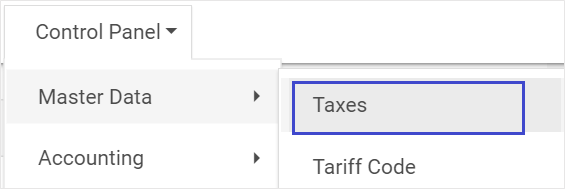
- Click on the Control Panel > Master Data > Taxes
- Taxes will be created in a new tab.
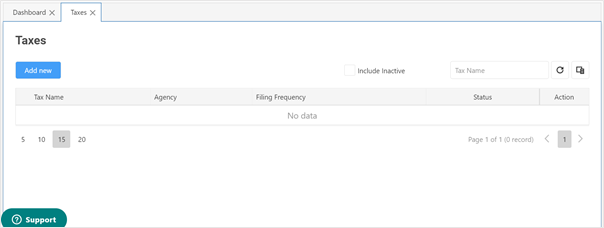
- Click on Add New button.
- Select SST from the dropdown list of the Type field.
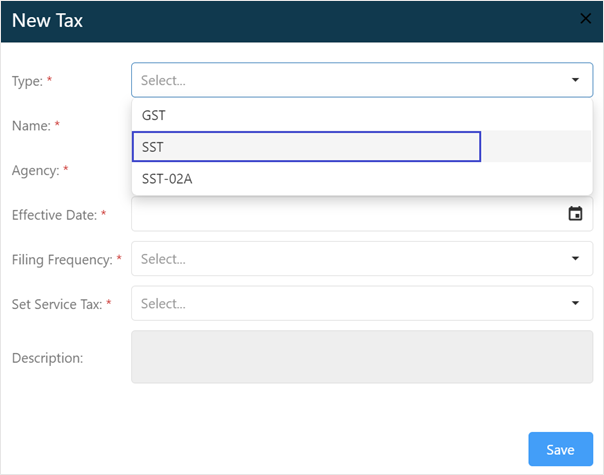
- Select the Effective Date, when your business becomes tax registered and start collecting tax from your customers.

- Tax Filing Frequency is set default as Every 2 Months.

- Set your company Service Tax Basis:
- Cash Basis
- Accrual Basis

- Once completed, click Save.
SST FAQ
Version English
Versi Bahasa Malaysia
Visit MySST for more information.
Comments
0 comments
Article is closed for comments.